Compared ·
Talking Pet Apps Compared: What Each One Actually Does
A talking pet app does one of three jobs. It moves the mouth on your pet's photo to your own recording, it guesses what a bark or meow means, or it uses AI to make a new video of your pet saying a line you type. We make AIPet, one of the AI video tools, so this guide also says where ours is the wrong pick.
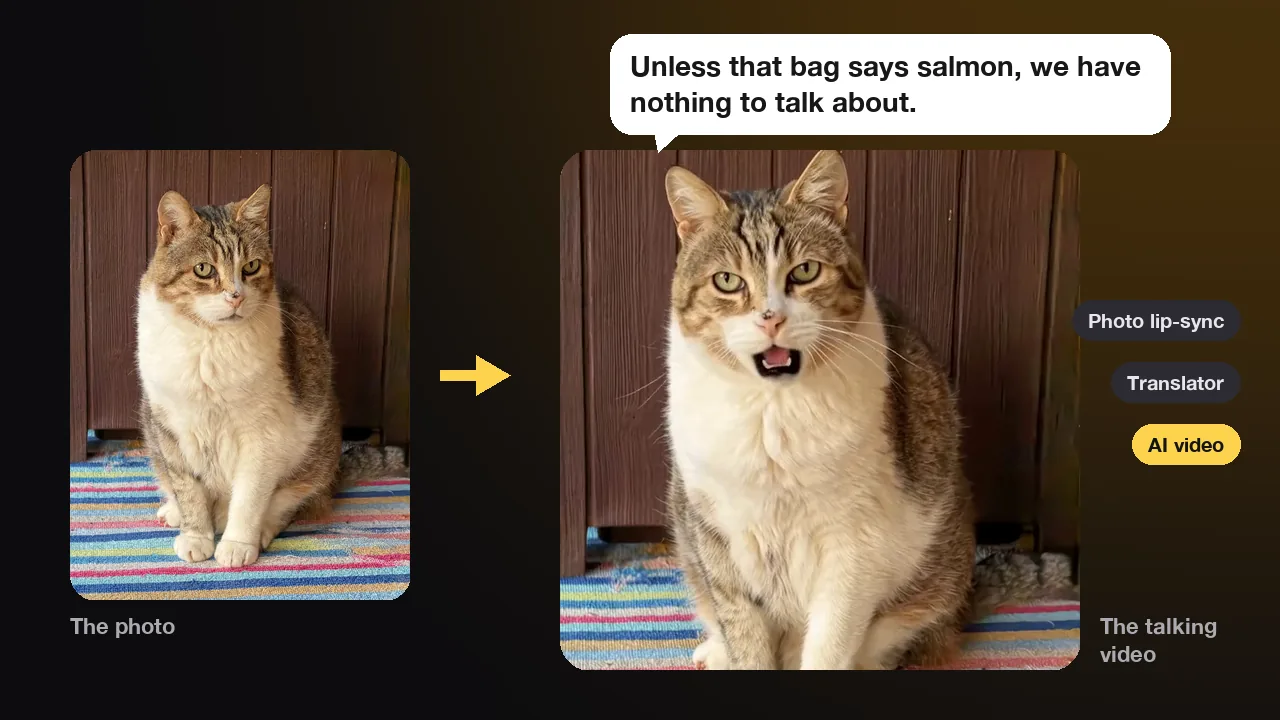
The three kinds of talking pet apps
Apps that promise a talking pet fall into three groups, and each one makes something different. Photo apps animate your still picture, translator apps react to sounds, and AI video tools generate a whole new clip.
| Kind | You give it | You get | Free version | Good for |
|---|---|---|---|---|
| Photo lip-sync app | A photo and your own recording, or a stock clip | Your photo with a moving mouth and eyes, the voice pitched up or down | Yes, with a watermark or a limit | A quick joke in your own voice |
| Pet translator app | Your pet's bark or meow, or your own voice | A label such as "hungry", or a bark played back | Yes, often with ads | A game, or a hint about mood |
| AI talking video maker | A photo and a typed line | A new video where your pet says the line in an AI voice | Usually one watermarked preview | A clip that looks like real footage |
The search results mix all three, which is why the word "app" can mislead. On October 18 we looked at the Google results for "dog talking app free". Four of the nine results were dog translator apps. The top two were the same photo lip-sync app, once on Google Play and once on the App Store. Two came from AI video sites. Someone who wanted a video of their dog saying "I ate the couch, no regrets" could easily install a bark soundboard instead.
The difference shows up in three places: what moves, whose voice you hear and what it costs. A photo app moves the mouth and eyes, while an AI video tool redraws every frame, so the ears, whiskers and head move too. Photo apps play your recording, and AI tools generate a voice from the words you type. A photo app runs on your phone in seconds. An AI video is rendered on large servers for every second of footage, so these tools charge per video or per second, while photo apps sell a monthly or weekly plan.
Translator apps sit apart from both. They don't put words in your pet's mouth on video at all. They listen, or they play sounds back.
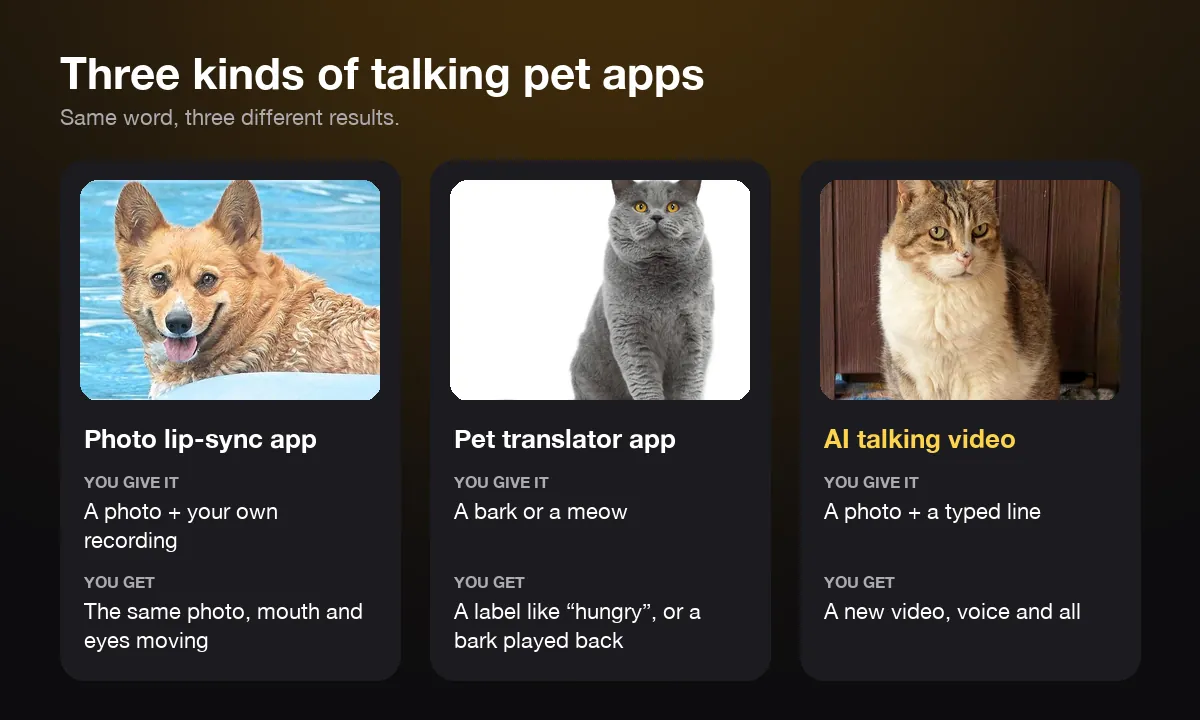
Which photo apps make your pet talk in your own voice?
My Talking Pet is the best-known one. You pick a photo, record a line or choose a stock clip, and the app moves your pet's mouth and eyes to match. It has a 4.8 rating from about 174,000 ratings on the US App Store, and the same app is on Google Play.
The appeal is speed and your own voice. You can pitch the recording from "big dog" to "little cat", add hats and glasses, and send the clip to friends a minute later. Free videos carry a watermark. The paid plan, called My Talking Pet Pro, removes the watermark and the limit on saving and sharing. On November 3, 2026 the US App Store listed it from $0.99 a week, $2.99 a month or $23.99 a year. Its subscription terms also say that free trials turn into a paid plan unless you cancel in time. In recent App Store reviews, long-time users still praise it, and the complaints are about the size of the watermark, a limit on free shares and the switch from a one-time purchase to a subscription.
Toppy works a little differently. It is called My Talking Animal & Pet App on iPhone and Talking Animals on Android, where it has more than 10 million downloads. The app scans your face as you record, and the pet copies the shapes your mouth makes. Its App Store page lists Premium at $7.99 a week or $59.99 a year, and several of its one-star reviews come from people who did not expect a weekly charge.
A few smaller apps do the same job. Talking Pet: Revive AI Photo on Android adds song templates and costumes. Talking Pet - AI Animal Editor on iPhone sells a one-time "Forever" option for $7.99, but its last update was in December 2023.
All of them share one limit: the rest of the photo stays still. The mouth area stretches over a frozen face, which reads as a cartoon. That suits a greeting card or a quick message, but it rarely looks like your pet really spoke.
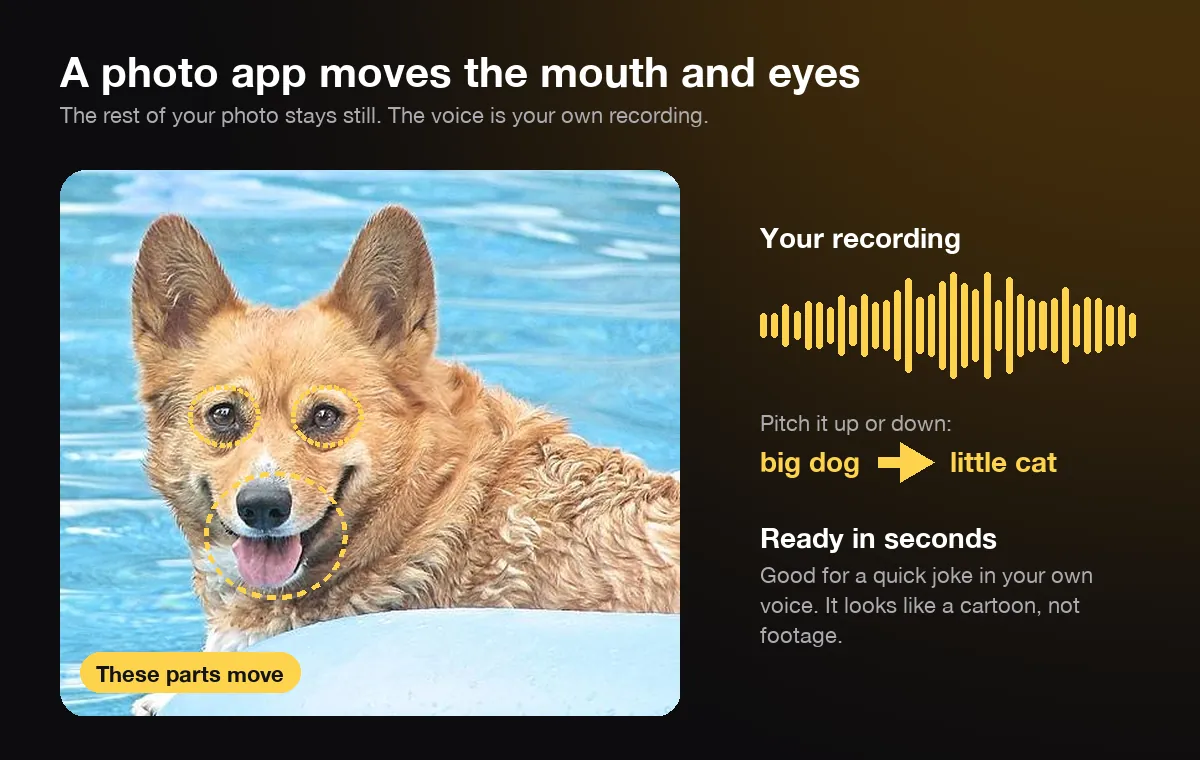
Can a pet translator app tell you what your pet is saying?
No app can turn a bark or a meow into a sentence. The best ones sort a sound into a short list of types, such as hungry, in pain or wanting attention. That label is a match between sound patterns, not a translation of words your pet has in mind.
MeowTalk is the best-known cat app of this kind. It records your cat and sorts each meow into one of 11 "intents", and the company says it has passed 20 million downloads since November 2020. It was built with one of the researchers behind a 2019 University of Milan study that compared meows from three situations: waiting for food, alone in an unfamiliar place, and being brushed. Scientific American's report on AI meow research says that system picked the right situation up to 96% of the time on meows it had not heard before. MeowTalk's own team members reported about 90% in a 2021 check, so that figure is not an independent test. The same article quotes a researcher who calls direct translation of animal language "kind of total nonsense". Sorting calls and linking them to behavior is real science. Turning them into sentences is not.
Dog translator apps are mostly soundboards. Dog Translator: Talk Pet Bark has more than 5 million Android downloads and shows ads, and its own description calls it a "human to dog bark translator joke". DogSpeak says it is "for entertainment purposes only". Pet Talk: Cat & Dog Translator does something closer to what most people want. It adds funny AI subtitles to a video of your pet, so the words are invented for laughs.
So decide what you are after. If you want your pet's real mood, its ears, tail and the situation tell you more than any app. If you want your pet to say something funny, you are writing the line yourself, and a photo app or an AI video does that better. For a real bark on cue, you can also teach your dog to "speak" with treats in a few short sessions.
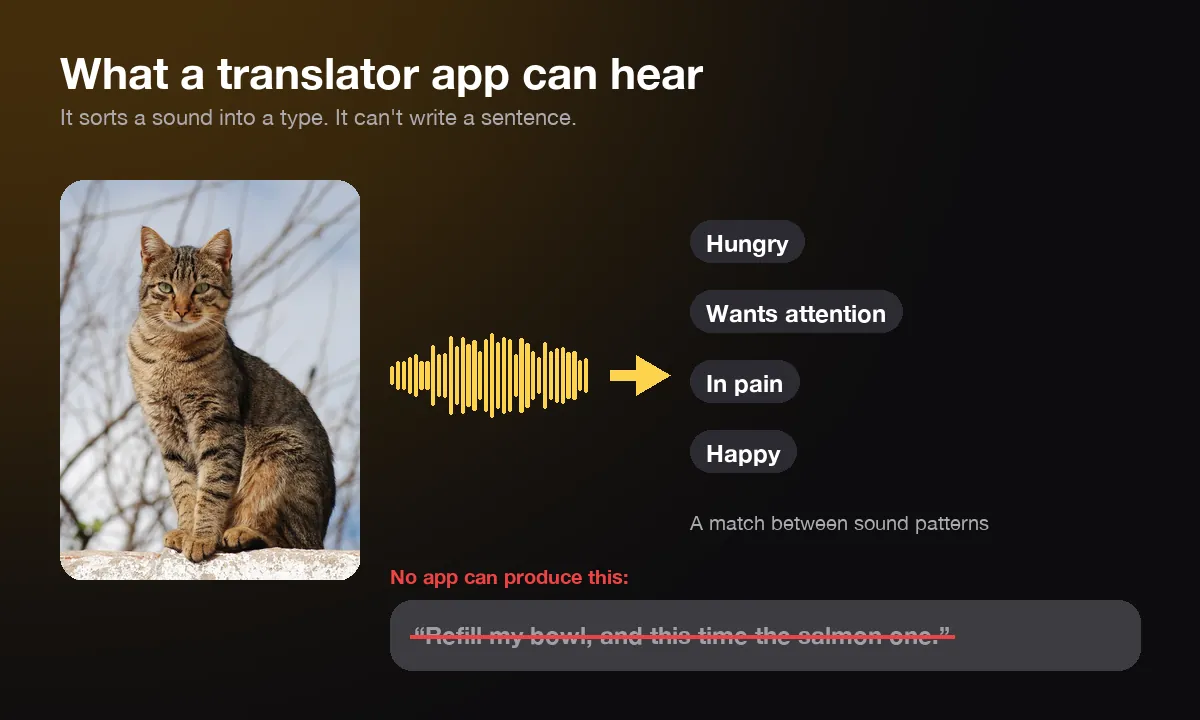
How are AI talking pet video tools different?
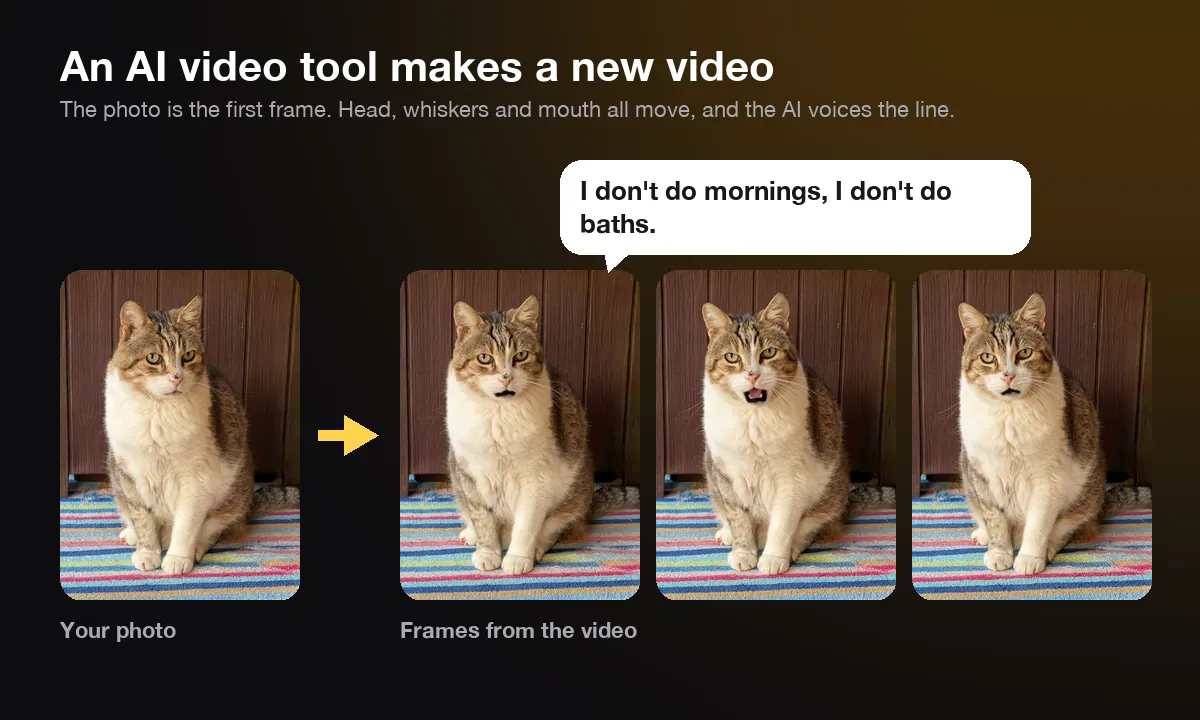
An AI video tool doesn't animate your photo. It uses the photo as the first frame of a new video and generates the voice as well, so the head, ears and whiskers move while your pet says your typed line. It takes a few minutes instead of seconds, and each video costs more to make.
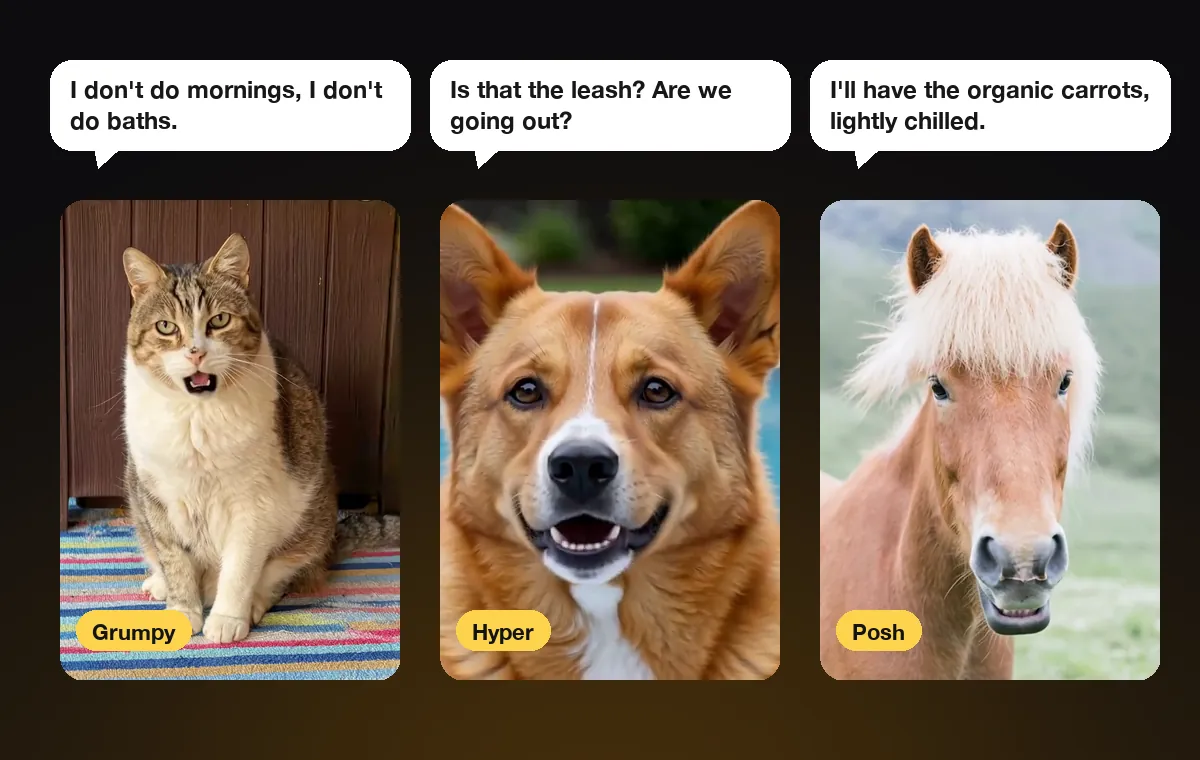
Several tools work this way. TalkingPets.ai and Mango AI run in a browser. TalkingPets.ai lets you type a line, record your voice or paste a TikTok link for the sound. WigglePet is a phone app that animates the whole pet and charges for video. AIPet is ours. On our talking pet app you upload a photo, type up to about 40 words and pick one of six voice styles: grumpy, sweet, posh, sassy, hyper or narrator. The AI voices the line, and the video runs up to 15 seconds. It works in the browser on iPhone, Android or a computer, so there is nothing to install.
The trade-off is control. You can't use your own voice on AIPet yet, and lines are spoken, not sung. In return the clip looks like footage of your pet, not a sticker with a moving mouth.
The main way these videos fail is identity drift. In October we gave four AI video models the same cat photo and the same line. All four said the line word for word, but one of them made the cat whiter and cuter than the real one. A sharp, front-facing photo keeps the pet looking like itself, and a dark, side-on or blurry one gives the AI room to invent. We picked the model that kept the cat's face closest, and we still tell people to check the eyes and markings before they post.
Is there a free talking pet app?
Yes, almost every talking pet app has a free version. Free usually comes with one of four catches: a watermark, a limit on saves or shares, ads, or a free trial that turns into a paid plan. Check which one applies before you make the video you care about.
| App | Free download | Paid plans listed (US, November 3, 2026) |
|---|---|---|
| My Talking Pet | Yes, videos watermarked | Pro from $0.99 a week, $2.99 a month or $23.99 a year |
| My Talking Animal & Pet App (Toppy) | Yes | Premium $7.99 a week or $59.99 a year |
| Talking Pet - AI Animal Editor | Yes | $0.99 a month, $4.49 a year or $7.99 once |
| AIPet (browser) | One talking video free, up to 15 words, watermarked | $2.99 keeps that video without the watermark; after that 14 credits a second |
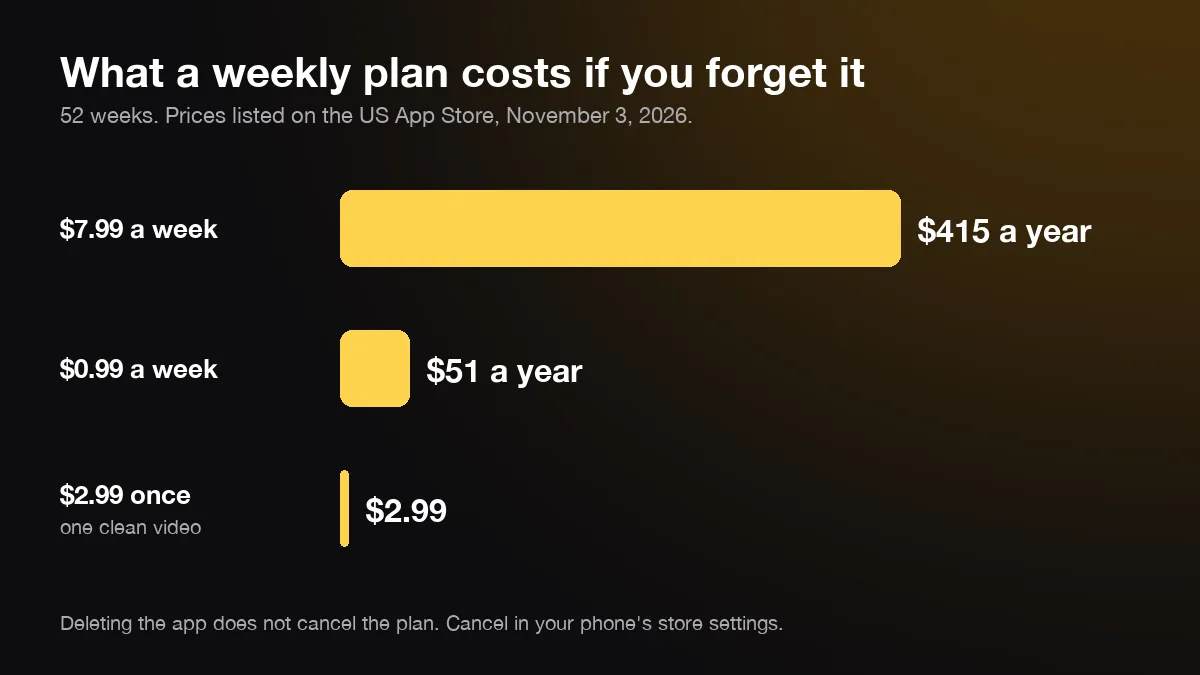
Weekly plans add up quickly. A $0.99 weekly plan costs about $51 over a year, and a $7.99 weekly plan costs about $415. Trials turn into a paid plan unless you cancel before the trial ends. Deleting the app does not cancel the plan either, as Google Play's help page warns.
Cancel through the store, not the app. On iPhone, open Settings, tap your name, then Subscriptions, as Apple's guide to cancelling a subscription shows. On Android, open the Play Store, tap your profile, then Payments & subscriptions. If you only want one clip, a one-off price is usually cheaper than a plan you forget about.
On AIPet a 10-second talking video is 140 credits. The smallest credit pack is 250 credits for $5.99, and Pro is $19.99 a month for 1,000 credits, which covers seven 10-second videos. If a video fails, the credits go back.
Which talking pet app should you pick?
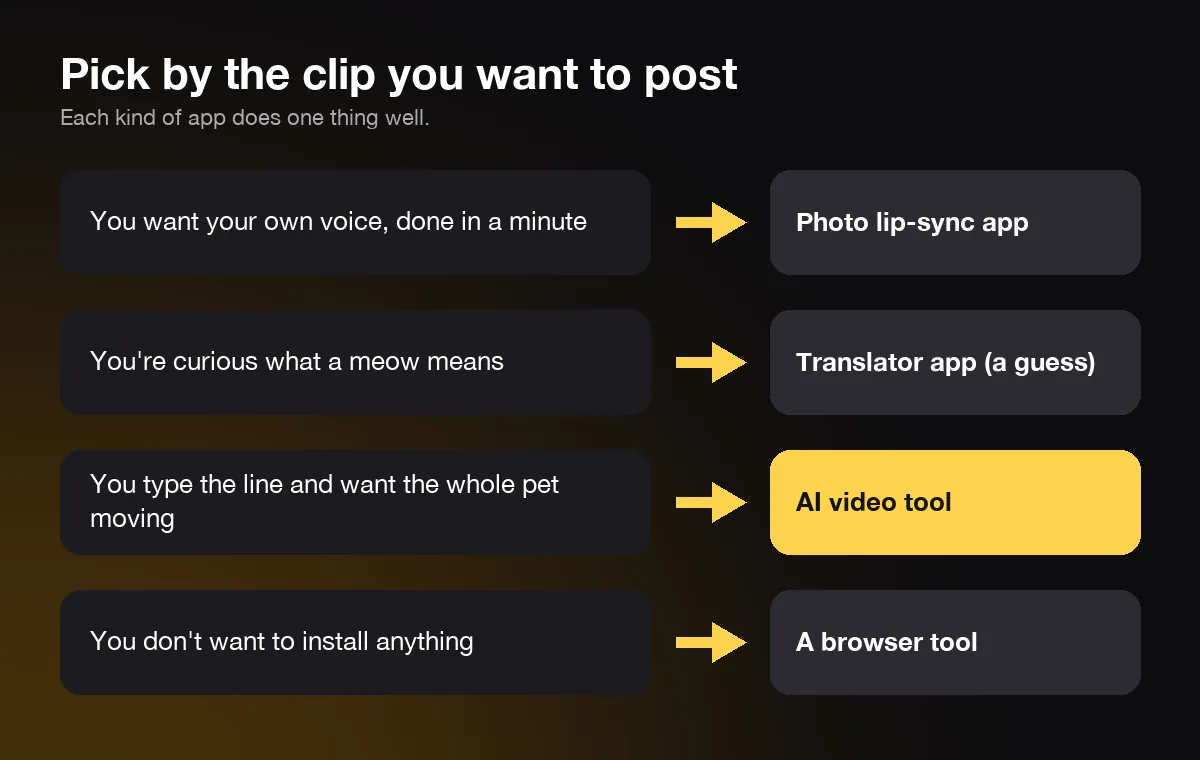
Pick by what you want to post. Each kind of app is good at one thing, so start from the clip in your head, not from the app store chart.
- Your own voice, done in a minute: a photo lip-sync app such as My Talking Pet. Expect a watermark on the free version.
- Curious why your cat yells at 5 a.m.: MeowTalk, as a hint about mood. Read the label as a guess.
- A line you type, voiced for you, with the whole pet moving: an AI video tool. On AIPet that is the talking pet app, and dogs and cats have their own pages too.
- No install, on a laptop or a shared phone: a browser tool such as TalkingPets.ai, Mango AI or AIPet.
- Singing or your own recorded voice in a realistic video: check each tool before you pay. AIPet does neither yet.
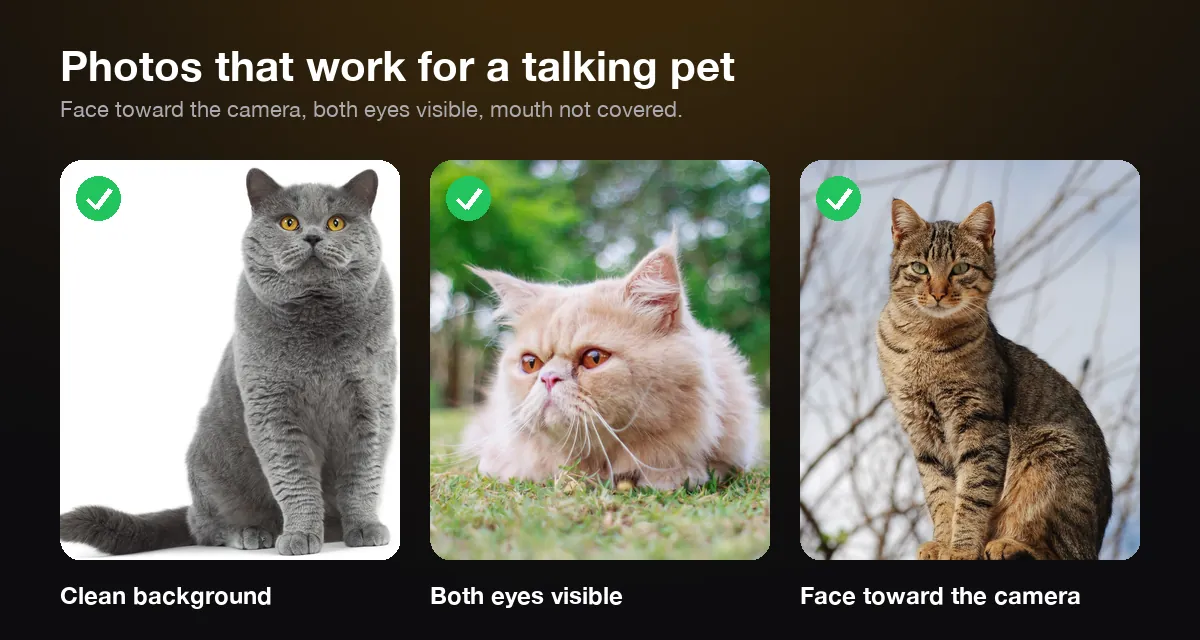
The photo matters more than the app. Every kind works best with your pet's face toward the camera, both eyes visible and the mouth not covered by a toy or a hand. Good daylight helps, and so does a photo at least 800 pixels wide. Small or heavily cropped photos lose the fur detail that makes your pet look like your pet.
Keep the line short. One or two sentences land the joke, and people watch to the end. On AIPet 15 words make about a 6-second video, and the longest line is about 40 words for 15 seconds. Our talking cat app has lines that work as starting points, such as "My bowl is half empty. That's an emergency. Act like it."
Talking pet apps FAQ
What is the best app to make my pet talk?
It depends on the clip you want. For a fast joke in your own voice, a photo app like My Talking Pet is the simplest. For a realistic video of your pet saying a line you type, use an AI video tool. Translator apps don't make your pet talk on video at all.
Can I make my pet talk with my own voice?
Yes, in photo lip-sync apps. My Talking Pet and Toppy both record you and move your pet's mouth to match, and My Talking Pet can pitch your voice up or down. On AIPet you type the line and pick one of six AI voice styles; your own voice isn't supported yet.
Is there a talking pet app for Android?
Yes. My Talking Pet, Talking Animals and Talking Pet: Revive AI Photo are all on Google Play. Browser tools such as AIPet also work in Chrome on Android, so you don't need to install anything.
Do talking pet apps keep my pet's photo?
It varies, so read the privacy policy before you upload. On AIPet the photo goes into private storage on your account and is deleted once your video is ready. Your video stays private unless you share it.
Can these apps make my pet sing?
Some can. Several photo apps and Talking Pet: Revive AI Photo have song templates. AIPet's talking videos are spoken only for now.
Should I say a talking pet video is AI?
Yes. TikTok and YouTube both ask creators to label realistic AI-generated video, and a talking pet that looks like real footage counts. A label rarely hurts a funny clip, because viewers enjoy the joke either way.
Next step
Pick a clear, front-facing photo, write the line your pet would say if it could, and make your pet talk. The first video is free with a watermark, so you can see your own pet speak before you pay anything.
Sources
- Scientific American, "What Is Your Cat Trying to Say? These AI Tools Aim to Decipher Meows", June 17, 2025, accessed November 3, 2026.
- Apple Support, "Cancel a subscription from Apple", accessed November 3, 2026.
- Google Play Help, "Cancel, pause, or change a subscription on Google Play", accessed November 3, 2026.
- App Store and Google Play listings for My Talking Pet, My Talking Animal & Pet App, Talking Animals, Talking Pet - AI Animal Editor, Talking Pet: Revive AI Photo, Dog Translator: Talk Pet Bark, DogSpeak and Pet Talk: Cat & Dog Translator (ratings, downloads, descriptions and in-app prices), accessed November 3, 2026.
- MeowTalk, home page, accessed November 3, 2026.